One URL can show different prices in Brazil, Japan and Mexico, and an AI agent only ever sees its own default view. How the Live Web Data API picks the country per request, with Coursera Plus and Squarespace prices fetched on 11 Nov 2026.
livewebdata.com · Live Web Data API by Teneo Protocol
Coursera's Coursera Plus page is one URL: coursera.org/courseraplus. Click it to test. Whatever country you are in, you land on the version for where you are, and you can't switch to another country. An AI agent's browser works the same way: it sees the page the way the site shows it to that browser's IP location.
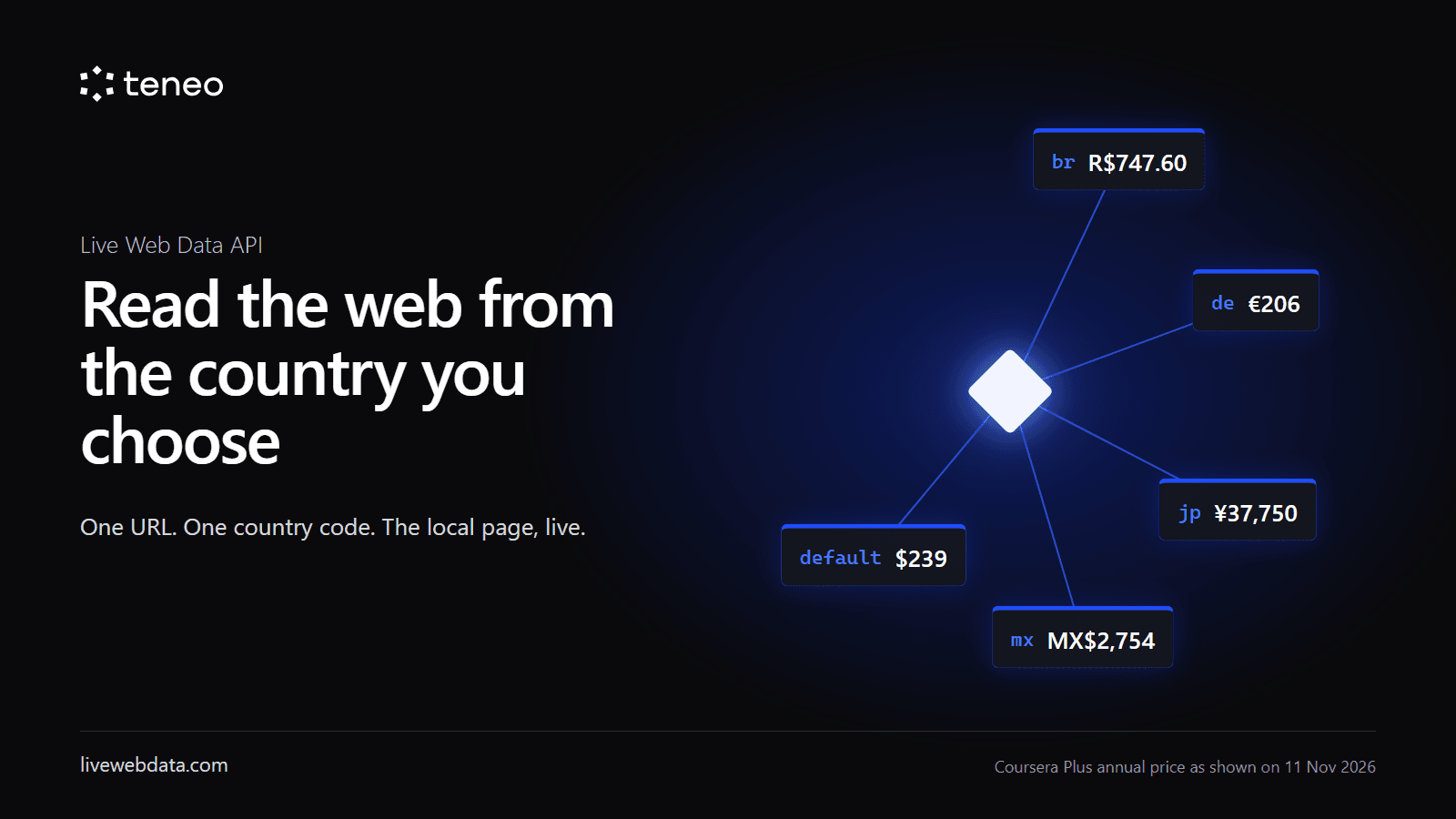
Seen from Brazil on 11 Nov 2026, a year costs R$747.60. From Japan, ¥37,750. From Mexico, MX$2,754. The default view says $239. From India you get a different page altogether, priced by the month.
For a person this is normal. For an AI agent it is a quiet source of wrong answers. The agent asks "what does this cost?", gets one default view of the page, and answers with confidence for a market the user is not in.
The Live Web Data API lets you pick the country on every request and get the page back the way people there see it, live by default today.
Why agents need a country
Some sites put the country in the URL. Netflix, for example, has a page per country, so an agent that knows where to look can open the Brazilian page and read Brazilian prices. Many sites don't. Coursera Plus is one URL for everyone, and the site decides what to show by where the visitor is.
On those pages an AI agent only ever sees one view: the view of wherever its own browser happens to be. In our tests on 11 Nov 2026 we asked ChatGPT and Claude for the Coursera Plus annual price in Brazil, Japan and Mexico. Both could open the page, but both only got the default $239 view and said they could not verify the local prices. The page itself says local pricing applies outside the US, but a tool without a country choice never sees it.
So an agent asked "what does this cost in Brazil?" either gives up or answers with the US price. For pricing teams tracking markets, research teams comparing countries, or an agent serving a user in Mexico, that default view is the wrong data, and it looks right.
With the Live Web Data API the agent picks the country, and the page comes back from a real connection in that country through our Teneo Protocol network, live.
We also ran the same pages through other web data APIs on 11 Nov. The large ones have no country option at all, so they can only return one view: the US page, in dollars. One other network does offer a country option, but only 1 of 11 requests came back in the right currency: a request for Brazil returned Canadian dollars, and one for Mexico returned the US price. With the Live Web Data API, all 13 requests came back in the right local currency.
Who needs these numbers to be right
- Pricing and revenue teams tracking competitors' prices and promotions market by market.
- Market research and consulting firms comparing what a product costs in Brazil, Japan or Mexico.
- E-commerce and travel comparison sites that show local prices to local users.
- Investment and equity research teams watching regional pricing as a signal.
- AI agents and assistants that answer "what does this cost?" for a user in a specific country.
For all of them, a price from the wrong country isn't a small error. It's the wrong answer, delivered with confidence.
Why the default view is a problem
- Wrong answers that look right. The agent does get an answer back, but it is the US view when it needed the view from Brazil, Japan or Mexico. A price in the wrong currency, or an offer that does not exist in the user's market, passes every format check.
- Stale answers that look right. Prices and promotions change. A number someone wrote down last month is not what the page shows today.
- Extra pipeline work. Teams that need local views end up running a separate fetch setup per region, plus a second tool to turn HTML into something a model can read.
We wanted one call that answers the real question: "what does a user in this country see on this page right now, as clean text my model can use?"
How it works
You send a URL and a country. You get the page back the way users in that country see it, fetched live through our Teneo Protocol network, as clean Markdown or text. It just comes back right.
curl -X POST https://livewebdata.com/api/v1/contents \
  -H "Authorization: Bearer $LIVE_WEB_DATA_API_KEY" \
  -H "Content-Type: application/json" \
  -d '{"urls": ["https://www.coursera.org/courseraplus"], "countryCode": "br"}'
countryCode takes a two-letter ISO country code such as br, jp, mx or in. You can send up to 10 URLs per request and up to 20 requests per second (custom limits for large enterprises).
Agents get the same thing over MCP: connect https://livewebdata.com/mcp with the same key and call get_page_contents with a URL and an optional country.
Example: Coursera Plus
Same URL every time: https://www.coursera.org/courseraplus. Only countryCode changes. The country isn't in the URL, and we found no country version of the page to link to instead. Fetched 11 Nov 2026.
| countryCode | Coursera Plus Annual, as shown on the page |
|---|---|
| br | R$747.60 / year (was R$1,246) |
| de | €206 / year (was €355) |
| jp | ¥37,750 / year (was ¥62,916) |
| mx | MX$2,754 / year (was MX$4,590) |
| (none, default view) | $239 / year (was $399) |
These aren't just exchange rates. India gets a different page altogether: on 11 Nov 2026, Coursera Plus at ₹2,099 a month, plus a gift offer at ₹7,499, instead of the annual layout other countries see. An agent reading the default view would see neither.
Why live matters here: on 11 Nov the annual price was a promotion, "Unwrap a full year of skills at 40% off", with the note "Offer ends November 30, 2026". After that date the same URL will show different numbers again. Prices that were collected weeks ago and published elsewhere already differ from what the page shows today. The only reliable source is the page itself, read now, from the right country.
Example: Squarespace
Same URL every time: https://www.squarespace.com/pricing. Fetched 11 Nov 2026.
Squarespace has sites in several languages, but language is not country. Its Portuguese site still showed "US$ 25 por mês" to a visitor outside Brazil. Only a visit from the country itself showed local prices:
| countryCode | Basic plan, monthly / annual billing, as shown on the page |
|---|---|
| br | R$56/mo / R$39/mo |
| in | ₹810/mo / ₹630/mo |
| jp | ¥1,480/mo / ¥1,180/mo |
| mx | MX$250/mo / MX$170/mo |
| de | €17/mo / €12/mo |
| gb | £16/mo / £12/mo, marked "30% off" |
| (none, default view) | $25/mo / $19/mo, marked "30% off" |
Prices change, so treat these tables as a snapshot of one day, not a reference.
What we learned testing
Two things we learned while testing:
- Not every site localises by visitor location. Many stores put the country in the URL, as a path, a parameter or a separate domain. There, the local version is one link away, and the right move is to request that local URL directly. Country steering matters most on pages like the two above, where the country isn't in the URL and the site decides by where the visitor is.
- Language is not country. A site in Portuguese or Japanese can still show US-dollar prices, as Squarespace's language sites did. So we test examples by country, not by language, and we check that no country URL gives the same result.
Where it is now
The Live Web Data API is in production at livewebdata.com: a REST API and a remote MCP server with one key, a country per request, live by default today, and docs, an OpenAPI spec and llms.txt for coding agents.
Pricing in one line: simple pages cost 1 credit and heavier pages cost more, for example 3. Details are at livewebdata.com/pricing.
One honest limit: results vary by site. Each site decides what it localises. Some ignore visitor location on some pages, and some sometimes serve a default view anyway. We do not promise that a specific site will return local prices.
If your agent or team answers questions about prices, offers or availability, try the same URL from two countries and compare. Docs, keys and pricing: livewebdata.com. Company: Teneo Protocol.
Key takeaways
- -Live web data
- -Live Web Data API
- -AI agents
- -Pricing data